Fahrtenbuch data export and transfer
EmailSending a PDF etc. by email – how does it work?
- Configure the export format you want in the settings.
- PDF, INtex, CSV, TSV etc. send the data by email to the address stored in the vehicle (in the iPhone settings under Mail, Contacts, Calendars > Default Account, your mail account must be set as the "default"!).
- Now go to the trip overview, tap the action arrow at the "top right" and then Send XX trips!
- The data is now handed over to the Mail app and can be sent!
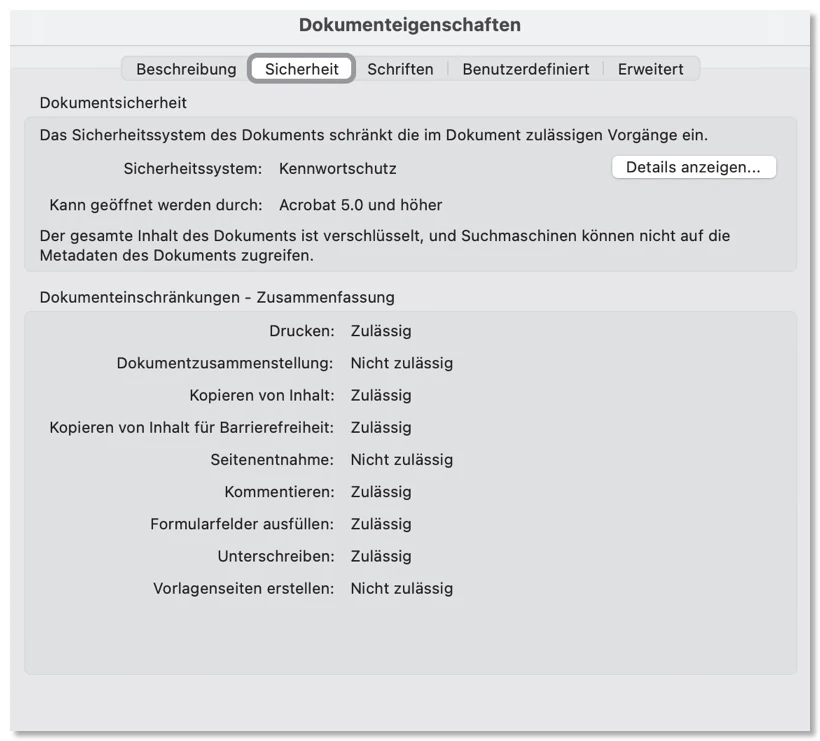
⚠️PLEASE NOTE | In current Fahrtenbuch versions, the PDF is saved encrypted. Printing, signing and copying content is of course allowed, but not changing content. That's why it's important to save the exported PDF from the email, Dropbox etc. directly to your hard drive and not to open it in other external programs and save it again there. In individual cases this can mean that third-party programs don't comply with the PDF standard and the PDF accidentally ends up completely password-protected.
So please don't open the attachment with a double-click; first save the document locally and then open it with a PDF reader, or forward the document to your tax advisor. ☞ The Fahrtenbuch.pdf document properties in Acrobat Reader: